Designing Your New Kit With AI? Here's How to Make It Work
A few simple steps that help us turn your AI design into a uniform that looks just like what you pictured.
More and more teams are sending us uniform designs they made with ChatGPT, Gemini and other AI tools. That’s great. It's a fast way to show us what you're picturing.
Here's what happens after you hit send, using a real example, plus a few easy things you can do to make sure the uniform you get matches the design you fell in love with.
A picture of a uniform isn't a uniform (yet)
Our uniforms are dye-sublimated. Your design is printed onto flat pieces of fabric, and those pieces are cut and sewn together. An AI image is something different: it's a picture of a uniform that doesn't exist yet. That creates three gaps we have to close.
- It invents seams. AI tools draw panels and piping wherever they look good. They don't know where the seams on our real pattern pieces are.
- The pattern is wrapped around a body. Textures in an AI image are stretched over muscles and shaded by fake studio lighting. To print, we need them flat.
- The colors come from the lighting. Highlights and shadows change every color in the picture. We match your design to the closest colors on our production chart.
So every AI design gets rebuilt by our designers as flat, print-ready art on our pattern pieces. The better the starting point you send us, the closer the finished uniform gets to your vision.
A real example
The ski club sent us this AI design for their Nordic race suits: deep maroon with a glowing crosshatch pattern, gold accents, an otter mascot and team lettering down the sleeves.
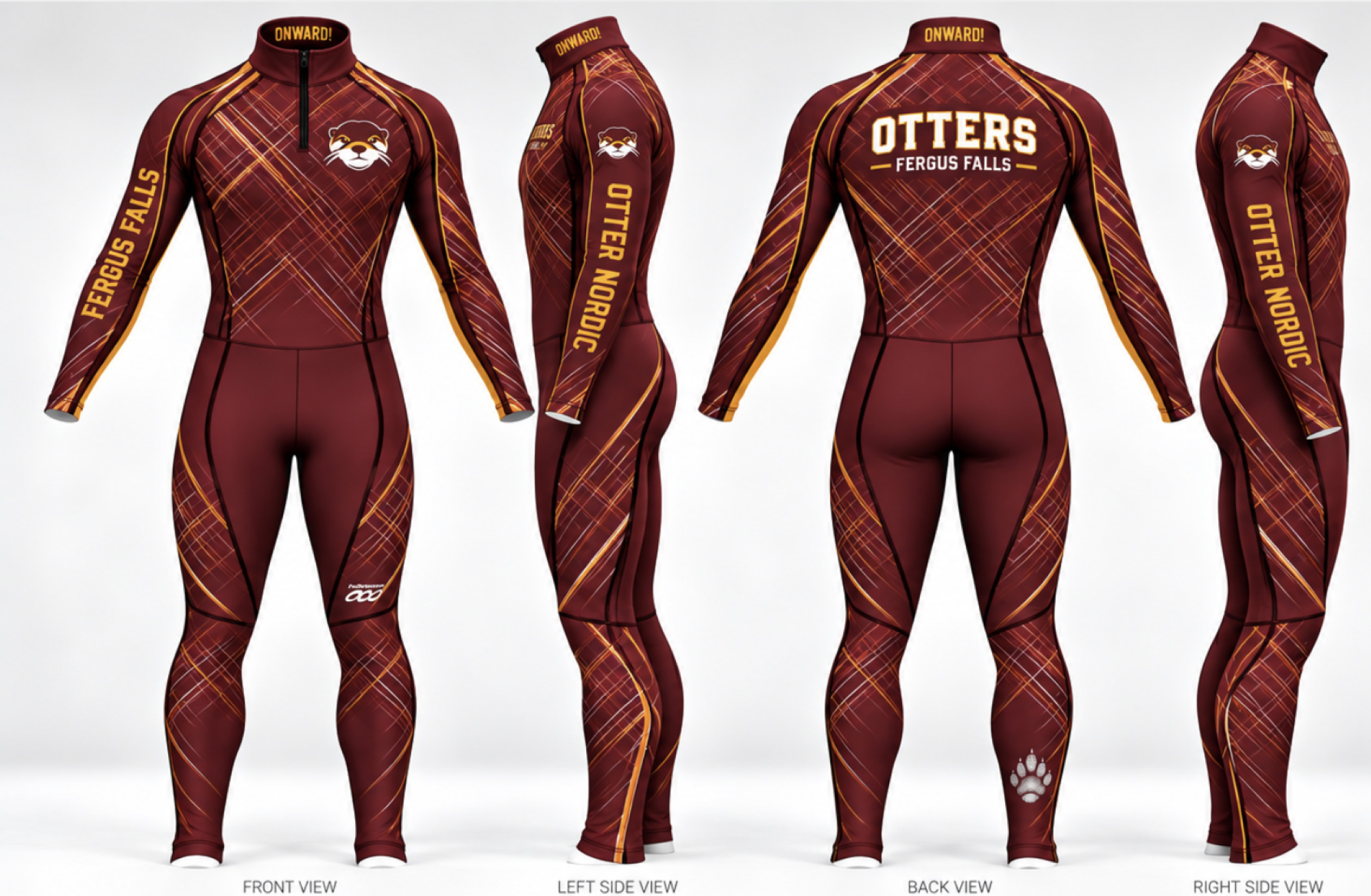
The Otters' AI design, front, sides and back.
Here's how we turned it into a uniform we can actually print.
1. The mascot
Cropped out of the AI image, the otter is small, soft and shaded. Our designers used Adobe Illustrator's AI tools to redraw it as clean vector art, then matched every color to our production color chart.
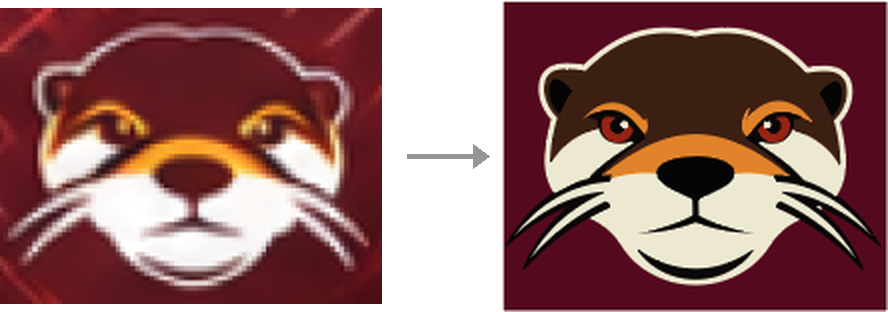
Left: the otter cropped from the AI image. Right: redrawn as clean, print-ready art.
2. The pattern
The crosshatch is the heart of this design, and you can't simply copy it out of the picture. We measured it instead: the angle of the lines, how they bunch together, how thick and thin they get, and which colors they use. Then we rebuilt it as flat art in our production colors, laid out across the real pattern pieces so the lines carry from one panel to the next.
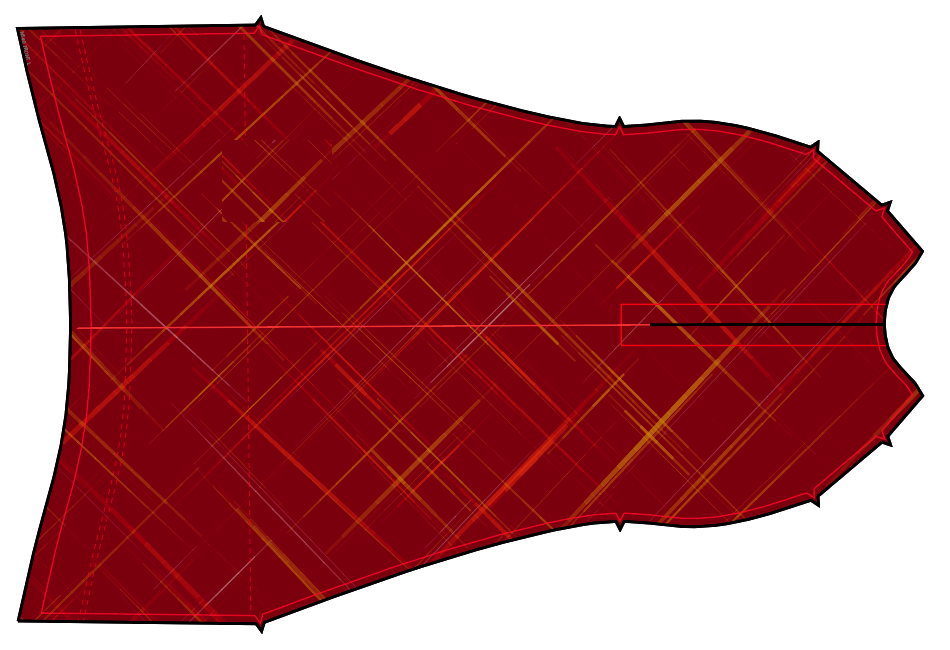
The front panel of the Otters' suit, laid flat, with the rebuilt crosshatch.
3. The lettering
The text is set in real fonts rather than copied from the image. AI tools are famous for slightly wobbly letters, and real type stays crisp at any size.
4. The details
Where the AI drew seams or piping that our suit doesn't have, we moved those details to the nearest real seam, so the finished suit keeps the same look and lines.
Is the rebuilt version identical to the AI picture? Close, but not pixel for pixel. The picture has lighting effects that don't exist on real fabric. That's exactly why every order gets a 3D proof approved by you before anything prints.
How to help us nail your design
When you send us an AI design, a few extra images from the same AI tool make a big difference. It should take about five minutes.

- Save your original image. Download the image itself at full size. Screenshots lower the quality.
- Get a flat image of your pattern. Go back to the same chat that made your design, so the AI remembers it, and paste this prompt:
Using the exact background pattern from the uniform design you made above, create a new image that shows ONLY that pattern, laid perfectly flat and viewed straight on, as a square swatch.
Keep the same colors, line thickness, spacing and style.
No uniform, no body, no folds or wrinkles.
No lighting, shadows, glow or 3D effects.
No logos, text or numbers.
Fill the whole square edge to edge.
Make it as high resolution as possible.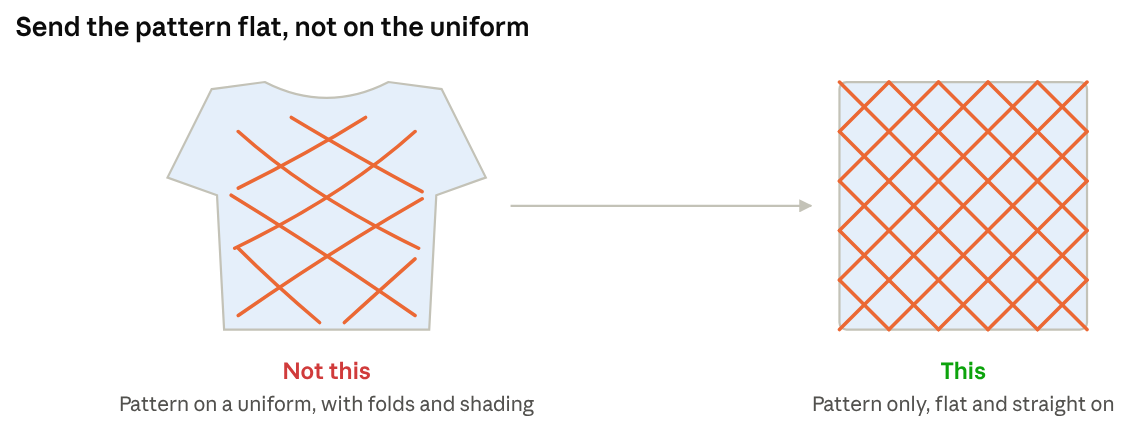
What we're after: the pattern on its own, flat and straight on. - Get a flat image of each logo or mascot. In the same chat, paste this once per logo, replacing the words in brackets:
Show ONLY [the logo or mascot] from the uniform design you made above.
Center it on a plain white background, flat and facing straight forward.
Keep the exact same colors, shapes and details.
No shading, lighting, texture or uniform behind it.
Make it as high resolution as possible. - Send it all to us, along with the name of the AI tool you used.
A few more tips
- One try is enough. If the flat versions come out a little different, send them anyway. Getting AI tools to repeat themselves exactly is hard, and we use these images as a guide, not a final file.
- Tell us your colors. If your team has official colors or Pantone numbers, include them. Otherwise we'll match the closest colors from our production chart.
- Send real logo files when you have them. If your school or club already has its logo as a vector file (.ai, .eps, .svg or a vector PDF), send that instead of the AI version. It will always look better.
- Don't worry about the lettering. Just tell us the exact words. We'll set them in a real font that matches the look. If you know the font you want to use, please share that as well. If we can't use that exact font, we'll find a close match.
- Expect a digital proof. You'll see and approve a 3D version and the flat pattern pieces before anything goes into production.
Ready to design?
Go ahead and dream it up with AI. Then send it our way with the extra images above, and we'll take it from picture to podium.
Questions? Reach out to your Podiumwear rep, call us at 651-330-2718, or visit www.podiumwear.com/contact.
FAQs
Visit our FAQs to learn more about our process, what we offer, timelines for design and completion and more.
FAQsContact Us
Contact our team at Podiumwear today if you have any questions about the design process, how to order or to find a storefront.
Contact Us